


May 25, 2026 7:00 AM
Updated May 29, 2026 1:32 AM
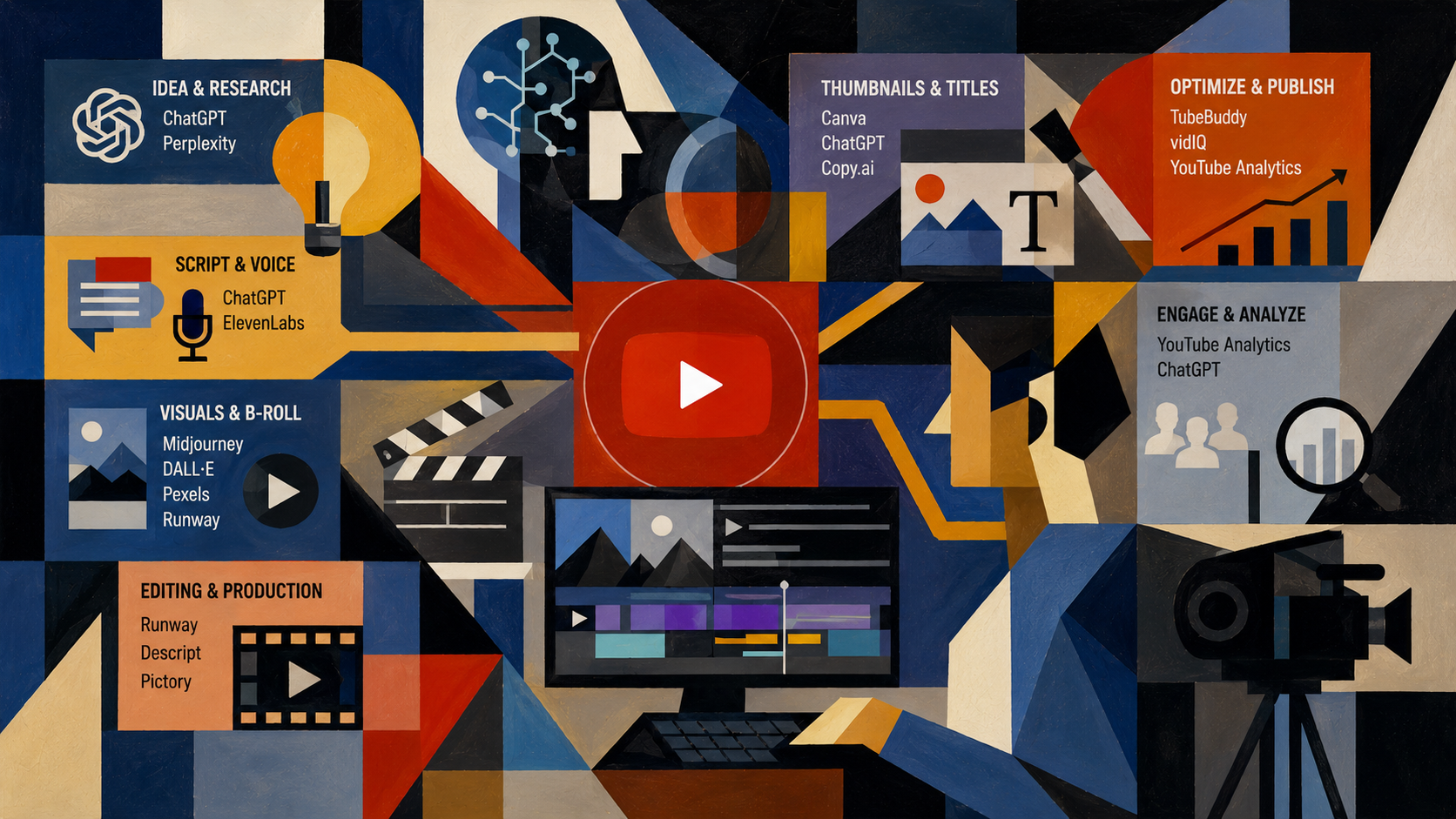
Learn how YouTube creators use AI video tools like Topview AI to generate B-roll, create faceless channel content, produce Shorts at scale, and 3x their upload frequency without burnout.
The creator economy is booming — but so is the competition. With over 500 hours of video uploaded to YouTube every minute, standing out requires not just great ideas, but also consistent, high-quality production. For many creators, that's the bottleneck.
What if AI could handle the heavy lifting — turning your concepts into polished videos, generating B-roll from product images, or even creating faceless channel content automatically?
This guide breaks down exactly how YouTube creators are using AI video tools to produce more content, faster, without sacrificing quality.
Why YouTube Creators Are Turning to AI
Related stories
The math is simple: YouTube's algorithm rewards consistency. Channels that upload 2-3 times per week grow significantly faster than those posting monthly. But traditional video production is exhausting:
- Filming takes hours of setup
- Editing a 10-minute video can take 8-20 hours
- B-roll and graphics require additional skills
- Burnout is the #1 reason creators quit
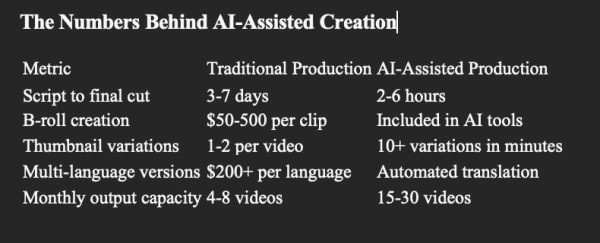
AI video tools like Topview solve this by compressing the production timeline. What used to take a week can now happen in an afternoon.
The Numbers Behind AI-Assisted Creation
5 Ways AI Video Tools Transform YouTube Workflows
1. AI-Generated B-Roll and Visual Assets
One of the biggest time sinks for creators is sourcing B-roll footage. AI video generators like Gemini Omni can transform static images into dynamic video clips — perfect for product reviews, tech channels, and educational content.
Best for: Product review channels, tech unboxing, educational content, lifestyle vlogs
2. Faceless Channel Content at Scale
Faceless YouTube channels are one of the fastest-growing niches. AI makes this model incredibly scalable:
- Write or generate a script using AI writing tools
- Create narration with AI voiceover
- Generate visuals from text descriptions or images
- Auto-edit with transitions, text overlays, and music
- Upload and optimize with AI-generated titles and thumbnails
3. AI Avatars for Presenter-Style Videos
AI avatar technology creates realistic digital presenters by GPT Image 2 for course content, news updates, multi-language content, and channel branding — no camera needed.
4. Smart Repurposing: Long-Form to Shorts
AI tools can identify engaging moments, auto-crop to 9:16, add captions, and generate multiple Short variations from a single video — multiplying your output without extra work.
5. Thumbnail and Title Optimization
AI now offers A/B testing at scale, click-through rate prediction, style transfer from top creators, and text placement optimization.
Building Your AI-Powered YouTube Workflow
Phase 1: Ideation & Research (30 minutes)
Phase 2: Script & Storyboard (1 hour)
Phase 3: Production (1-2 hours)
Phase 4: Assembly & Polish (1-2 hours)
Phase 5: Optimization & Upload (30 minutes)
Total time: 4-6 hours per video (vs. 15-25 hours traditionally)
Best Practices for AI Video on YouTube
- ✅ Use AI as an accelerator, not a replacement for your unique perspective
- ✅ Always review and refine AI-generated content before publishing
- ✅ Maintain your authentic voice
- ✅ Combine AI-generated and filmed footage for variety
- ❌ Don't publish 100% AI-generated content without adding value
- ❌ Don't sacrifice quality for quantity
Monetization Impact
Conclusion
AI video tools aren't replacing YouTube creators — they're supercharging them. Tools like Topview make professional-quality video production accessible to everyone.
FAQ
Q: Will YouTube penalize AI-generated content?
YouTube allows AI-generated content as long as it provides value and follows community guidelines.
Q: What's the best AI video tool for YouTube creators?
For product-focused content, Topview excels at turning images into professional videos.
Q: Can AI help with YouTube SEO?
Absolutely. AI tools can optimize titles, descriptions, tags, and generate transcripts for closed captions.
Q: How much do AI video tools cost for creators?
Most platforms offer plans between $20-100/month — far less than hiring editors or buying stock footage.
Comments

Powered by RoundtableAn AI/DeFi-powered Enterprise Media Operating System. Learn more at Roundtable.io.© Roundtable 2026. By using this site you agree to the Terms of Use and Privacy Policy