


Aug 14, 2024 7:00 AM
Updated Aug 18, 2024 11:08 PM
While most people are familiar with basic VPN features like encryption and IP masking, several lesser-known features can significantly enhance your VPN experience.
In today’s digital age, protecting your online privacy and security is more important than ever. Virtual Private Networks (VPNs) have become essential tools for this purpose.
While most people are familiar with basic VPN features like encryption and IP masking, several lesser-known features can significantly enhance your VPN experience.
Let’s dive into these features and see how they can improve your online life.
Split Tunneling
Split tunneling allows you to route some of your device’s traffic through the VPN while letting the rest access the internet directly. This means you can choose which apps or websites use the VPN and which don’t.
Related stories
Imagine you’re working from home and need to access your company’s secure network through a VPN, but you also want to stream a movie on Netflix without any lag.
Split tunneling makes this possible by allowing you to use the VPN for work while streaming directly from your local internet connection.
Split tunneling is perfect when you need to access local network devices like printers or smart home gadgets while still using the VPN for other activities. It’s also great for bypassing geo-restrictions on streaming services without slowing down your internet connection.
Kill Switch
A kill switch is a safety feature that automatically disconnects your device from the internet if the VPN connection drops. This prevents your data from being exposed.
Picture this: you’re using a public Wi-Fi network at a coffee shop, and your VPN connection suddenly drops. Without a kill switch, your real IP address and sensitive information could be exposed.
A kill switch ensures that doesn’t happen by cutting off your internet connection until the VPN is back up.
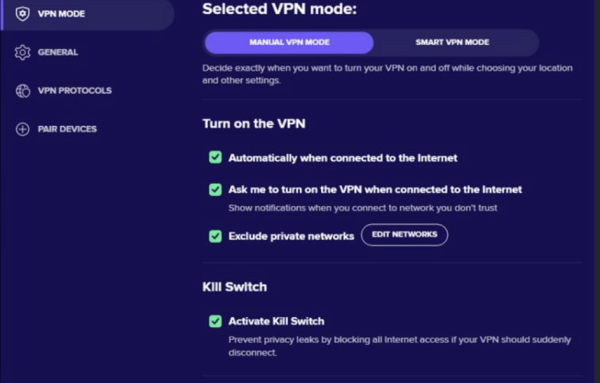
Enabling the kill switch is usually straightforward. In popular VPN clients like Avast SecureLine VPN for windows, NordVPN and ExpressVPN, you can find this option in the settings or preferences menu under security features. Just toggle it on, and you’re good to go.
Multi-Hop Connections
Multi-hop, or double VPN, connections route your internet traffic through two or more VPN servers, adding an extra layer of encryption.
Think of multi-hop connections as a relay race. Your data is encrypted and sent to one VPN server, then re-encrypted and sent to another server before reaching its final destination. This makes it much harder for anyone to trace your online activities back to you.
While multi-hop connections provide enhanced security, they can also slow down your internet speed. It’s important to balance the need for security with performance requirements.
If you’re doing something highly sensitive, like whistleblowing or accessing restricted content, the extra security is worth the trade-off.
Ad and Tracker Blocking
Some VPNs come with built-in features that block ads and trackers, enhancing your browsing experience.
Blocking ads and trackers can significantly improve your browsing speed and reduce data usage. More importantly, it protects your privacy by preventing advertisers from tracking your online activities and building a profile on you.
While standalone ad-blocking software can be effective, using a VPN with ad and tracker blocking provides an additional layer of privacy and security. It ensures that your data is protected at the network level, not just in your browser.
Obfuscation (Stealth Mode)
Obfuscation, or stealth mode, disguises VPN traffic to make it look like regular internet traffic, helping to bypass VPN blocks.
This feature is particularly useful in restrictive regions where VPN usage is monitored or blocked. For example, if you’re traveling to a country with strict internet censorship, obfuscation can help you access the internet freely without detection.
Obfuscation works by using special protocols that mask VPN traffic. This makes it difficult for network administrators or government agencies to identify and block VPN connections. It’s like putting on a disguise to blend in with the crowd.
Dedicated IP Addresses
A dedicated IP address is a unique IP address assigned exclusively to you, unlike shared IP addresses used by multiple users.
Dedicated IP addresses reduce the risk of blacklisting and provide more reliable access to certain services, such as online banking or remote work applications.
They also offer a consistent IP address, which can be useful for accessing certain websites or services that require IP whitelisting.
Users who frequently access sensitive services or need a consistent IP address for business purposes will benefit most from a dedicated IP address.
It’s also useful for gamers who want to avoid IP bans or for those who need to access geo-restricted content.
WireGuard Protocol
WireGuard is a modern VPN protocol known for its simplicity, speed, and security.
WireGuard offers faster connection speeds and improved security compared to traditional protocols like OpenVPN and IPSec. Its streamlined codebase reduces the risk of vulnerabilities, making it a more secure option.
Many leading VPN providers, including Avast SecureLine VPN, NordVPN and Surfshark, now support WireGuard. Enabling it typically involves selecting WireGuard as the preferred protocol in the VPN client’s settings. It’s a great choice for users who want the best performance and security.
Closing thoughts
Exploring and utilizing lesser-known VPN features like split tunneling, kill switch, multi-hop connections, and more can significantly enhance your online experience. These features offer improved security, privacy, and performance, making your VPN usage more effective and tailored to your needs.
Additional Tips

- Choosing the Right VPN: When selecting a VPN for pc, ensure they offer the features discussed in this article. Look for reputable providers with strong privacy policies and good customer reviews.
- Staying Updated: Keep your VPN software updated to access the latest features and improvements. Regular updates also ensure that you benefit from the latest security enhancements.
Comments

Powered by RoundtableAn AI/DeFi-powered Enterprise Media Operating System. Learn more at Roundtable.io.© Roundtable 2026. By using this site you agree to the Terms of Use and Privacy Policy