



Jul 10, 2026 2:18 AM
Updated Jul 15, 2026 3:18 AM
Industry metrics from 2026 demonstrate that cross-device synchronization directly impacts user engagement and platform trust scores.
The behavioral patterns of modern sports fans have evolved rapidly away from single-screen constraints. While deep statistical research and multi-match tracking often take place on high-resolution desktop configurations, live execution requires an immediate transition to mobile devices.
When evaluating modern platform efficiency, utilizing a trusted portal like UFA Bet (ยูฟ้าเบท) ensures that your security encryption keys remain uniform across both smartphone and desktop interfaces. This structural cohesion prevents account fragmentation and latency spikes during critical operational shifts.
Industry metrics from 2026 demonstrate that cross-device synchronization directly impacts user engagement and platform trust scores. Users expect their customized navigation environments to mirror precisely across multiple active operating systems. Platforms failing to maintain continuous session states introduce critical friction that can lead to missed opportunities during live events. Consequently, technical layout symmetry serves as a necessary foundation for modern, data-dense digital entertainment ecosystems.
How Does Cross-Device Session Synchronization Work?
The underlying mechanics of cross-device migration rely heavily on secure token generation and real-time cloud data transfers. When a user authenticates on a desktop machine, the centralized database assigns a unique cryptographically signed session token.
Related stories
As the user transitions to a mobile device, this active token is parsed securely via JSON Web Tokens (JWT) or OAuth protocols. This framework permits the mobile interface to instantly recognize the user state without forcing a manual credential overwrite.
Maintaining this real-time link prevents discrepancies between detached hardware points. The transmission pipelines operate over protected WebSocket protocols to ensure data updates happen simultaneously. By relying on immediate database syncing, the system keeps essential account parameters locked into a singular state.
- Persistent Bet Slips: Selections made on a PC monitor populate automatically in your mobile tray.
- Unified Digital Wallet: Real-time balance updates across all active end-points prevent internal ledger delay.
- Biometric Bridging: Transitioning from alphanumeric passwords on desktop to FaceID or fingerprint scans on mobile happens instantly.
Desktop vs. Mobile Login: A Technical Comparison
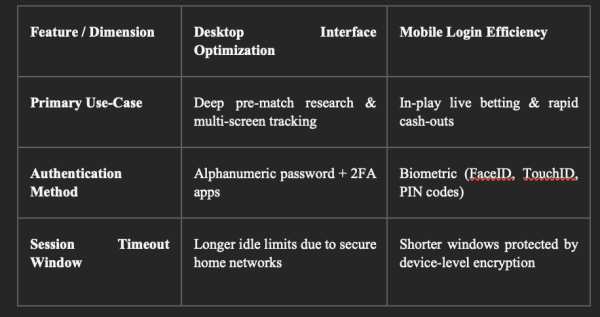
Understanding the structural differences between fixed-station computing and mobile web deployment allows users to maximize their navigation setups. While desktops handle large visual data arrays effortlessly, mobile terminals favor rapid execution and localized data processing. Both entry pathways link into the identical secure core database but optimize for different user settings.
Steps to Safely Transition Your Session to Mobile
Migrating an active session requires strict adherence to digital security hygiene to prevent credential leakage. Optimizing your settings via the official ufabet architecture allows you to change devices mid-match without risking a session rejection during critical odds shifts. Following an established manual progression keeps your session data safe from potential external exploitation.
- Network Hygiene: Establish a Secure Connection Path
Ensure your smartphone is disconnected from unencrypted public wireless networks before starting the migration process. Activating your cellular provider's native 5G or 4G data pathway forms an isolated tunnel that resists local interception.
- Hardware Protection: Activate Device Biometrics
Turn on FaceID or native Android fingerprint recognition systems inside your preferred mobile browser settings panel. This step links your cryptographic key storage directly to physical identity markers for automated future logins.
- Authentication Link: Initiate Mobile Access Gateway
Launch your mobile web portal using the verified landing page link to trigger the cloud synchronization request. Enter your login keys or utilize saved keychain variables to pull your desktop state onto the mobile display.
- State Audit: Verify Live Data Updates
Check your active dashboard layout immediately to confirm that your financial balances and pending bet slips are showing properly. A successful sync indicates that the central server has mapped your session across devices flawlessly.
Why Do Sports Fans Demand Flawless Mobile Access?
Live sports analytics demand immediate system responsiveness due to the fast-moving nature of real-time match data. A delay of even a few seconds can prevent a user from locking in a position before lines lock or change dynamically.
Data tracking sports fan behaviors shows an overwhelming preference for platforms that offer uninterrupted uptime, which explains why soccer fans prefer ufabet for online betting due to its high-speed loading times during live match windows. Lightweight data payloads ensure that vital data transitions execute seamlessly even during peak server demands.
Furthermore, mobile frameworks allow fans to interact with live trackers while away from fixed home offices or streaming monitors. The modern user profile relies on a split-screen existence, matching televised media feeds with handheld interface tracking. Therefore, providing optimized system paths across all handheld viewports directly removes obstacles to a unified digital experience.
Frequently Asked Questions (FAQ)
Can I remain logged into both desktop and mobile concurrently?
Most secure platforms allow single-session authentication for safety. Logging into your mobile account will securely terminate or sync the older desktop session to protect your wallet balance from unauthorized access. This design methodology limits the vulnerability window of your profile if an open terminal is left unattended.
What should I do if my mobile login fails during a live match?
Ensure your device is not connected to a restrictive public Wi-Fi network that blocks iGaming protocols. Clearing your mobile browser cache or utilizing the official access pathways provided by ufabet will resolve minor synchronization delays instantly. If the problem persists, switching from Wi-Fi to direct cellular data often resets the localized routing table.
Comments

Powered by RoundtableAn AI/DeFi-powered Enterprise Media Operating System. Learn more at Roundtable.io.© Roundtable 2026. By using this site you agree to the Terms of Use and Privacy Policy