

Video Editing Made Easy


Video Editing Made Easy
Jun 9, 2026 7:00 AM
Updated Jun 12, 2026 11:27 PM
If you want to extract some interesting piece of an online program, background music, or your lecture program, you'll love this feature.
Extract audio from video, extract audio from video, mp4 to mp3 is one of the most popular requirements from bloggers, students, and digital editors who want to convert their video media to a pure audio format. If you want to extract some interesting piece of an online program, background music, or your lecture program, you'll love this feature.
However, modern tools aim to make this as convenient as possible, and there is already a solution called AudioCut that is a small, online by default, quick conversion tool to extract sound from video files. Without the need to install any program, and especially with this competitive advantage on free space, AudioCut is very appealing.
Understanding Audio Extraction in Modern Editing
Extract the soundtrack from a video file. When users can just specify an MP4 conversion to MP3 by using a free online tool that provides this feature immediately, instead of coming to a heavy editing tool. Users normally convert an MP4 to an MP3 format, as the size of an MP3 is smaller and supported in almost all devices.
AudioCut makes it simple and easy to do this in just a few simple clicks that ignore all computing languages and complex structures. Forget all those long-drawn conventional methods by taking advantage of what is provided in the browser itself, no downloads, no setup,p and no installation to wait for.
Related stories
Why Extracting Audio Matters
There are many practical reasons why users need to Extract audio from video files:
- Creators Repeat Soundtracks to Tracks for Reels, Podcasts, and Social Media
- Students turn recorded lectures into portable audio notes for easy revising.
- Editors free uvoice-overs for smoother production.
- Webinar audio is used by businesses as training material.
How AudioCut Simplifies the Process
It is designed with an intuitive three-step process, making extracting audio from video as easy as the following.
Step 1: Upload Video File
The user starts by choosing a video file from the drive. Or they can simply drag it from the desktop. It makes uploading easier and quicker.
Step 2: Preview on Timeline
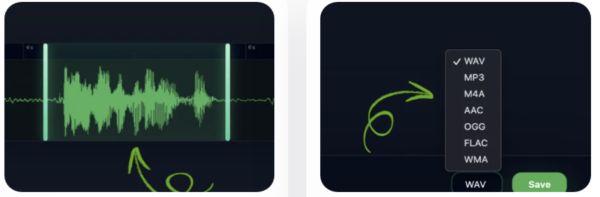
After the video has been uploaded, it is added to a 'timeline'. We can play and pause the video, and electronically scrub through it, to check we're capturing the right part of the video. Once we're happy with the result, we can move on to export the video.
Step 3: Choose Format and Save
All that is left to do is choose the output type to save the video in. The default format is most likely to be an MP3 file, as it can be opened and played in nearly any application. Click one button and the software will immediately extract and download the sound file.
Key Advantages of Using AudioCut
AudioCut is designed to be fast. Nothing needs to be installed as it works right in the user’s browser, and no powerful hardware or skills are necessary. It is designed for speedy conversions in case you do a lot of MP4 to MP3 conversions.
Additional benefits include:
- Fast processing speed
- Clean and simple interface
- No installation required
- Works on most modern browsers
Conclusion
On average, quickly find that it is the easy-to-use, intuitive, and versatile platform that brings a host of options for working with audio and video files. Saving time and effort in the workflow with simple commands that create a direct link from MP4 to MP3— AudioCut has everything needed. So powerful yet so seamless in converting MP4 to MP3!
Comments

Powered by RoundtableAn AI/DeFi-powered Enterprise Media Operating System. Learn more at Roundtable.io.© Roundtable 2026. By using this site you agree to the Terms of Use and Privacy Policy