


Mar 3, 2025 8:00 AM
Updated Mar 7, 2025 1:32 AM
Printing customized flyers is one of the most affordable ways to promote a product, service, or event compared to digital ads.
Introduction
Flyers have long been a powerful marketing tool for businesses, events, and personal promotions. With the rise of digital printing and online design tools, printable flyer templates have become more accessible and customizable than ever before. This guide explores how to create effective printable flyers, where to find the best templates, and how to use them for maximum impact.
Why Use Printable Flyer Templates?
1. Time-Saving Solution
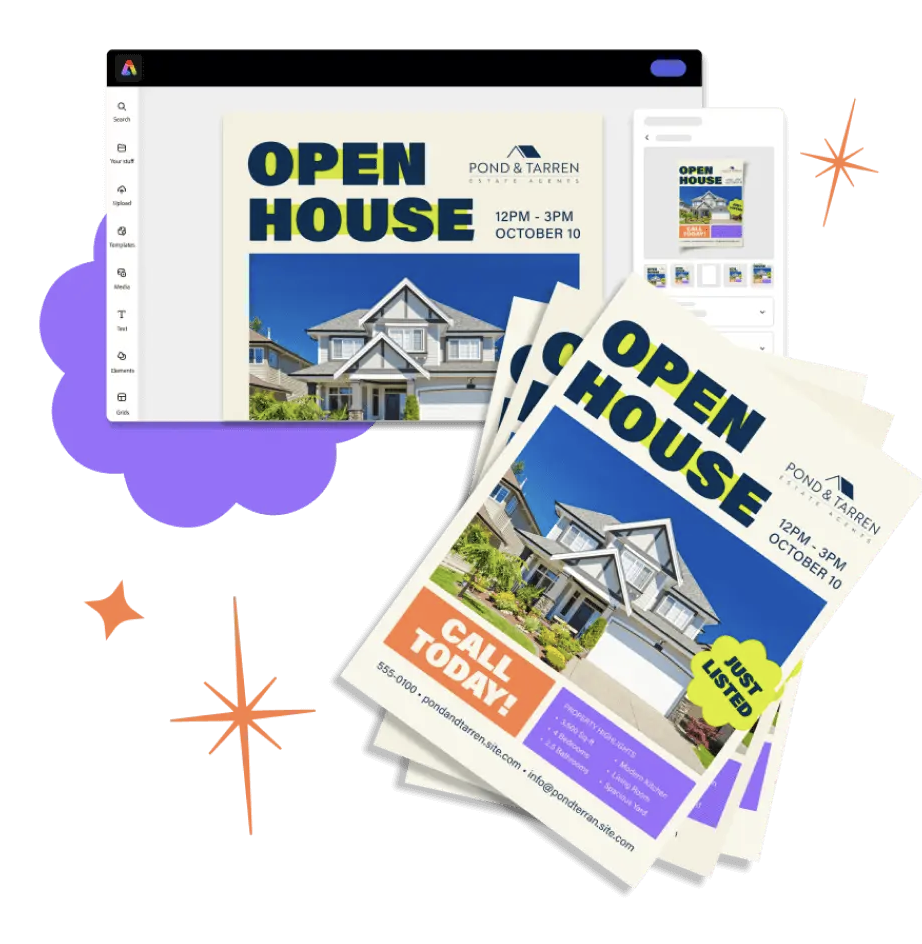
Instead of designing a flyer from scratch, using a pre-made template can significantly cut down on time and effort.
2. Professional Design Quality
Many flyer templates are created by experienced designers, ensuring an aesthetically pleasing and well-structured layout.
3. Customization Flexibility
Templates allow users to modify colors, fonts, images, and text, making them perfect for different industries and purposes.
Related stories
4. Cost-Effective Marketing
Printing customized flyers is one of the most affordable ways to promote a product, service, or event compared to digital ads.
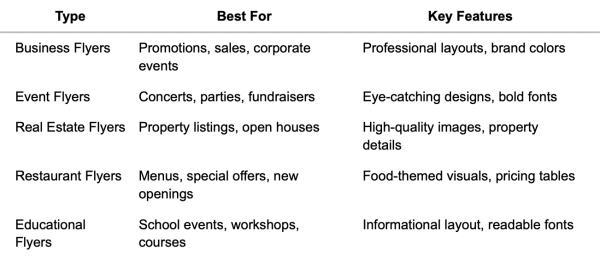
Types of Printable Flyer Templates
How to Choose the Right Flyer Template
1. Define Your Purpose
Before selecting a template, consider the objective of your flyer. Are you advertising a sale, an event, or a new service?
2. Consider Your Audience
Different demographics respond to different designs. A corporate flyer should look polished and formal, while a music festival flyer should be vibrant and artistic.
3. Ensure Customizability
Check if the template allows easy modifications to text, images, and colors to align with your branding.
4. Compatibility With Editing Tools
Some templates are designed for Adobe Photoshop, Illustrator, Canva, or Microsoft Word. Make sure the template is compatible with the software you use.
Design Tips for an Effective Flyer
1. Use High-Quality Images
Visual appeal is crucial. Choose sharp, high-resolution images that relate to your message.
2. Keep Text Concise
Flyers should deliver information quickly. Use short, compelling headlines and bullet points.
3. Highlight Important Details
Ensure the flyer answers the key questions: Who? What? When? Where? Why? How?
4. Use Contrasting Colors
Contrast enhances readability. Dark text on a light background (or vice versa) ensures clarity.
5. Include a Call-to-Action (CTA)
Encourage the reader to take action. Examples:
- "Call now for a free quote!"
- "Visit our website to register!"
- "Limited seats available – Sign up today!"
"A well-designed flyer is not just a piece of paper; it’s a marketing tool that speaks volumes about your brand." – John Doe, Marketing Expert
Where to Find the Best Printable Flyer Templates
1. Free Resources
- Canva – User-friendly and offers thousands of free templates.
- Adobe Express – Great for professionals looking for high-quality designs.
- Piktochart – Ideal for infographics and educational flyers.
2. Premium Resources
- Envato Elements – Offers a vast collection of premium flyer templates.
- Creative Market – A marketplace for unique, high-end flyer designs.
- Shutterstock – Includes professionally crafted templates with commercial licensing.
Printing Tips for Your Flyer
1. Choose the Right Paper
Glossy paper enhances colors, while matte paper provides a professional look.
2. Optimize for Print Resolution
Ensure your design is at least 300 DPI (dots per inch) to avoid pixelation.
3. Select the Right Print Size
Common flyer sizes include:
- 8.5” x 11” (Standard US Letter Size)
- A4 (8.3” x 11.7”) (International Standard)
- 5” x 7” (Handout Flyers)
4. Test Print Before Bulk Printing
Always print a sample to check for any errors or misalignments before mass production.
"Your flyer’s success depends on the perfect blend of design, content, and print quality." – Jane Smith, Graphic Designer
Distributing Your Flyers Effectively
1. Hand-to-Hand Distribution
Engage with potential customers by handing out flyers in high-traffic areas like shopping centers or events.
2. Bulletin Boards and Local Shops
Pinning flyers on community bulletin boards or placing them in local businesses can attract attention.
3. Mail Marketing
Sending flyers through direct mail can be effective for targeting specific neighborhoods.
4. Digital Distribution
Convert your flyer into a PDF or image format and share it via email, social media, or your website.
Conclusion
Printable flyer templates simplify the design process, making it easy for businesses and individuals to create visually appealing marketing materials. Whether you are a beginner or an experienced marketer, utilizing the right flyer template can save time, enhance your branding, and improve audience engagement. Start designing today and watch your promotional efforts soar!
Frequently Asked Questions (FAQs)
1. What software is best for editing flyer templates?
Popular choices include Canva, Adobe Photoshop, Illustrator, and Microsoft Word.
2. Can I print flyers at home?
Yes, but for high-quality prints, it's recommended to use a professional printing service.
3. What is the best size for a flyer?
The standard size is 8.5” x 11”, but smaller sizes like 5” x 7” are also effective for handouts.

4. How do I make my flyer stand out?
Use bold headlines, high-quality images, and a strong call-to-action to grab attention.
5. Can I use free flyer templates for commercial purposes?
It depends on the license. Always check the terms before using a free template for business use.
Comments

Powered by RoundtableAn AI/DeFi-powered Enterprise Media Operating System. Learn more at Roundtable.io.© Roundtable 2026. By using this site you agree to the Terms of Use and Privacy Policy