


Sep 16, 2023 7:00 AM
Updated Sep 18, 2023 10:15 PM
Professionals from a variety of sectors now use Power BI because of its comprehensive capabilities and user-friendly design.
Microsoft's robust business intelligence and data visualization tool, Power BI, has completely changed how businesses view and analyze their data.
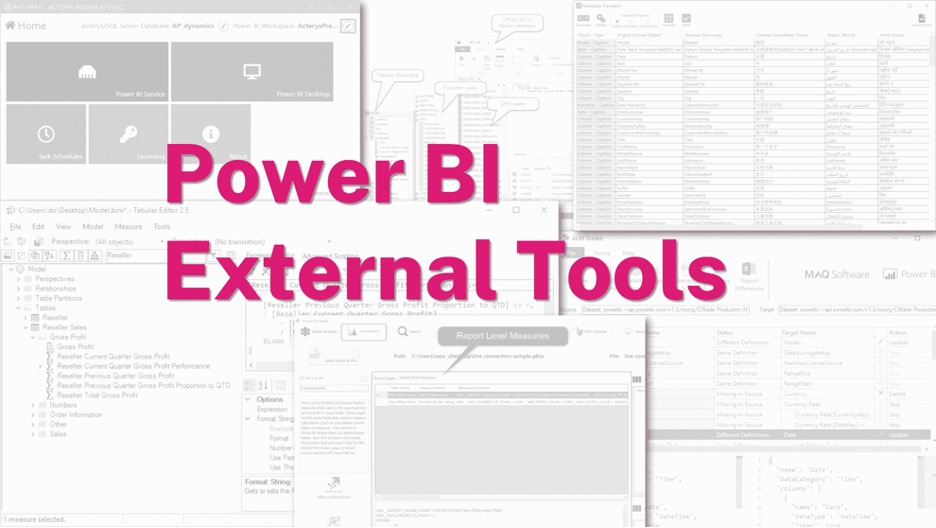
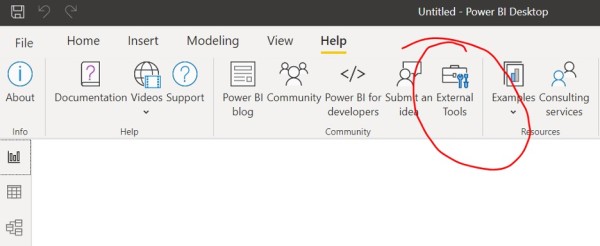
The External Tools ribbon allows you to quickly access external tools that are installed locally and registered with Power BI Desktop. Power BI Desktop provides the name and port number of its internal data model engine instance, as well as the current model name, to the tool when started from the External Tools ribbon. The tool then connects automatically, resulting in a flawless connecting experience.
Professionals from a variety of sectors now use Power BI because of its comprehensive capabilities and user-friendly design.
Categories of Power BI External Tools
Semantic modeling - Open-source tools like DAX Studio, ALM Toolkit, Tabular Editor, and Metadata Translator extend Power BI Desktop functionality for specific data modeling scenarios like DAX query and expression optimization, application lifecycle management (ALM), and metadata translation.
Related stories
Data analysis - Tools for querying data and doing other analytical activities by connecting to a model in read-only mode. A tool, for example, may start Python, Excel, and Power BI Report Builder. The utility links the client application to the model in Power BI Desktop for testing and analysis without requiring the Power BI Desktop (pbix) file to be published to the Power BI service initially. This category also includes tools for documenting a Power BI dataset.
Miscellaneous - Some external tools do not connect to a model at all, but instead augment Power BI Desktop to provide useful recommendations and content. PBI.tips tutorials, the DAX Guide from sqlbi.com, and the PowerBI.tips Product Business Ops community tool, for example, make it easy to install a wide range of external tools. These tools, which include DAX Studio, ALM Toolkit, Tabular Editor, and many more, also make it simple to register with Power BI Desktop.
Custom - Add your own scripts and tools to the Power BI DesktopExternal Tools folder by adding a *.pbitool.json document.
Keep the following points in mind when installing external tools:
- Power BI Desktop for Power BI Report Server does not support external tools.
- External tools are made available by third-party contributors. Microsoft does not offer support or documentation for third-party tools.
Integration's Significance in Power BI
Integration refers to the act of merging disparate technologies or systems to function as a cohesive and effective workflow.
Integration is important in the context of Power BI for a number of reasons. Its primary benefit is that it gives customers access to more features than Power BI comes with out of the box.
Power BI Data Source: Direct Query
To connect to a database data source, you must provide the server name/user name and password. The connection may also be made by a direct SQL query utilizing Advanced options or by selecting Data Connectivity mode- Import or DirectQuery.
This gives businesses the ability to customize their data analytics solutions to meet their unique requirements and acquire a competitive advantage.
DirectQuery keeps the data in the SQL database, restricting data modification, and is real-time, therefore no scheduling is required because updates are performed automatically, whereas Import allows for data translation and manipulation but requires scheduling to provide continual refresh.
Furthermore, users may connect to several data sources and systems via integration with external tools, dismantling silos and promoting thorough data analysis.
The External Tool Ecosystem for Power BI
Microsoft has created an ecosystem of third-party products that easily interact with Power BI.
These third-party programs perform various tasks, including data processing and preparation, reporting, and visualization.
1. Tables for Editor
Improving Analysis and Modeling of Data
One popular external tool that helps Power BI users improve their data modeling and analysis skills is Tabular Editor.
2. DAX Software
Enhancing DAX Inquiries
The formula language used in Power BI to create custom computations and aggregations is called Data Analysis Expressions (DAX).
3. Excel BI Assistant
Record-keeping and Evaluation
For both novice and seasoned Power BI users, Power BI Helper is an invaluable external tool.
4. Data Connectors on the Outside
Growth in Data Sources
Although Power BI comes with built-in connections for many different types of data sources, there are situations in which users need to be able to connect to unique or specialized data sources.
The Advantages of External Power BI Tools for Organizations
Companies with several regional offices frequently struggle with data gathering and proper analysis. As a result, detecting a new problem is frequently too late to prevent it from becoming a larger one.
Every company has different business procedures and data needs. With the help of Power BI External Tools, Power BI solutions may be easily tailored to these particular requirements.
Access Internal, Cloud, and Third-Party Data Sources to Create Custom Dashboards
Companies may see the most critical parts of their operations by gathering data from various sources and developing personalized Power BI dashboards for the company.
The visual charts can employ data retrieved from an Oracle database, a Google Sheets spreadsheet, an Excel file, SAP, or even a QuickBooks system.
Reporting Integration for 3CX VoIP Systems, Dynamics 365, and More
Some firms have already implemented the 3CX Cloud VoIP phone solution. For call storage, this takes advantage of the Microsoft Azure cloud infrastructure. The use of 3CX, including real-time call information and recordings, is possible within Dynamics 365, and enhanced reporting is possible within Power BI.
Regularly Updated and Completely Compliant
Power BI is updated weekly with new features and upgrades to enable for more complex reporting.
Furthermore, comprehensive compliance at the country and sector levels guarantees that the benefits of Microsoft Power BI are available to everyone.
Microsoft Family User Interface is well-known.
Power BI's user interface is comparable to that of Microsoft 365. Anyone who is already comfortable with Microsoft Word, Excel, or PowerPoint will be at ease.
Additionally, firms that already use Microsoft Dynamics 365 may significantly improve their business analytics capabilities.
Power BI Desktop, Pro, and Premium versions are available.
The Power BI desktop client allows you to create new reports. Anyone who desires to utilize it has access to it. Reports can be stored alone on the PC or published and shared with individuals or organizations via the Power BI Service.
Power BI Pro and Power BI Premium editions include cloud-based enhanced report sharing as well as more customisation possibilities. The Premium version – mostly used by enterprises – enhances performance, data capacity, and programmatic access, such as APIs.
Using PowerBI for Business Reporting
Business reports are only as good as the facts on which they are based. Multiple major omissions might lead to erroneous inferences being taken from the provided reports.
Power BI provides best-in-class reporting capabilities. This begins with data visualizations generated by Microsoft and other parties utilizing an open-source methodology to improve data visualization skills on an ongoing basis.
AI and machine learning are used, allowing the user to submit inquiries and receive suggestions for information sources to utilize in their report.
Data may be visualized and modeled before being used in reports using Power Query, which is known to sophisticated Microsoft Excel users. This data may then be used to generate reports.
The visual reporting canvas supports drag-and-drop capabilities. This enables the creation of unique reports for the CEO, the board of directors, top management, or a team. Managers and team members alike may produce amazing interactive reports with predicted insights that are properly tailored to the requirement.

Access to a wide range of data sources is required to do this. Data may be collected using Power BI from Excel spreadsheets, SQL Servers, MySQL and PostgreSQL servers, Microsoft Dynamics 365, Microsoft Defender, Amazon Redshift, Google BigQuery, Microsoft Cloud, Salesforce Reports, Github, Microsoft Exchange Server, and many more sources.
Comments

Powered by RoundtableAn AI/DeFi-powered Enterprise Media Operating System. Learn more at Roundtable.io.© Roundtable 2026. By using this site you agree to the Terms of Use and Privacy Policy