
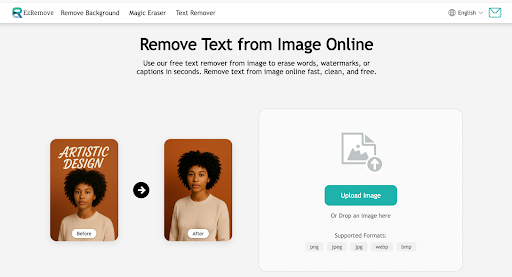


Sep 19, 2025 7:00 AM
Updated Sep 23, 2025 2:07 AM
EzRemove.ai is able to automatically process photos to give your photos a high quality.
Poorly arranged backgrounds are immediate killers of what an otherwise beautiful picture is. Are you capturing the images of your products to post online, or just capturing a picture to share some of your activities on the social platform?
At this point, EzRemove.ai alters the game. The tool includes a rapid, free, and comprehensive background removal based on its innovative artificial intelligence. There is no need to use some layers, and you're using brushes — just a few clicks will be enough to make your photo clean.
EzRemove.ai is able to automatically process photos to give your photos a high quality. In this case, you are either an entrepreneur who owns an e-business or a content maker willing to create an image that would be close and noticeable. With EzRemove.ai, one can perform professional editing without having to use Photoshop or more complex tools.
What is EzRemove.ai?
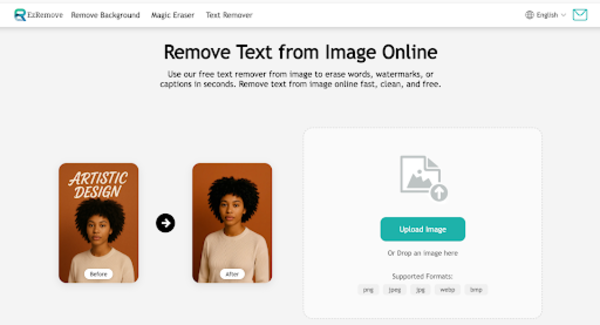
EzRemove.ai is an artificial intelligence product that is a web-based photo editing technology, designed to make the previously most exhausting process in design, which is background removal, text removal, and object removal, simpler. Even better, you need not sign up. All that you have to do is upload a photograph, and the AI will do the rest in a few minutes.
Related stories
Simply put, more complex algorithms drive EzRemove.ai to automatically detect subject of an image and then remove it from the backdrop. The latter is considered to be one of its shining assets since it still manages to capture fine etchings such as hair strands, garment folds, or shadows.
Furthermore, EzRemove.ai can handle various commonly-used file types, rendering it compatible with most of the use cases, including online stores as well as individual projects and includes PNG, JRG, WEBP, and BMP.
Top Features That Make EzRemove.ai Stand Out
- Fast AIs Background Removal (5s Processing)
The speed of EzRemove.ai qualifies as one of the most remarkable attributes of the program. The tool can provide clean results within five seconds, as opposed to manually removing the background with the help of manual time that would have consumed hours.
- eCommerce, eCommerce Batch Processing
Online sellers on websites such as Amazon and Etsy, or other selling platforms, can use product photos to make a deal or sell the product. It is time-consuming to edit dozens or a hundred images by hand.
- Text & Watermark Eraser
An image may be hindered by unwanted text or watermarks on how to utilise it. It is a dedicated text removal function by EzRemove.ai, which allows one to delete words smoothly.
- Erases Objects with Magic Eraser
The Magic Eraser functionality gives the user the option to store the photos in a refined state that is used in a presentation or marketing campaign, or a personal project, by removing objects that can divert attention.
- High Resolution (Transparent PNGs) Output
EzRemove.ai does not downsize or blur images, contrary to a great number of free tools. These IPNG files are compatible with all digital platforms in real-time without distortion or pixelation, regardless of whether they are to be printed, on the web, or on a social media platform.
These attributes, combined with others, render EzRemove.ai a one-stop answer to the issue of any individual who wishes to have their photographs edited fast, reliably, and without involvement in any technical issues.
Background Removal with EzRemove.ai: Step-by-Step Manual
The EzRemove.ai is so easy to use that even an absolute amateur can make a professional-level run. Here’s how:
Step 1: Upload your photo
Publishing your image on Go to the EzRemove.ai site and fasten your image by dragging it or by clicking on the lot to do so using your computer or phone as your device. It supports PNG, JPG, WEBP, and BMP.
Step 2: Let AI auto-detect
The system immediately scans your picture and recognises the subject of the picture. The most remarkable thing is that within five seconds, the background is neatly cleared up, giving you a clear backdrop.
Step 3: Edit as needed
The default result is not satisfactory? On the one hand, you can sharpen edges, crop or even change the background to a solid colour or a custom-made image.
Step 4: Download high-res PNG
When you are satisfied with your edit, you can go ahead to download the final product. You’ll get a high-resolution transparent-background PNG file to be embedded on websites/social media, or even marketing media.
Creative & Professional Uses of EzRemove.ai
EzRemove.ai can also be used by various individuals with a broad spectrum of users, including business owners and casual photo editors,, due to its flexibility.
E-commerce Sellers
Presentation of products in online markets such as Amazon, Shopify, Etsy, and others demands professional-level product photos. EzRemove.ai refers to sellers being able to produce continuous and distortion-free images that satisfy the requirements of the platforms and get buyers faster.
Content Creators
Instagram, TikTok, and YouTube creators and influencers rely heavily on images. Clean and clean office photos and thumbnails will make the content visible in a full feed. EzRemove.ai assists artists in creating visual content that is considered appealing with little emphasis.
Photographers & Designers
Practitioners who are in need of quick mockups, customer previews, or advertisement material can save time and yet the accuracy is maintained with EzRemove.ai. It specifically comes in handy when making mass edits within strict deadlines.
Personal Use
Not all users are business people. EzRemove.ai equally competes well in our personal needs such as resume headshots, passport-style photographs or repairing family album photographs. Any person can enjoy themselves with instant, sharpened photographs without having to pay an editor.
EzRemove.ai Try Now, Free, Quick and Pro
You are fed up with spending numerous hours on Photoshop or spending money on awkward software? It makes it easy to eliminate the background with EzRemove.ai. Huge background results ATAC. You can produce top-quality goods over the internet, generate content, and sort out all the personal photography in a couple of seconds with the free AI-based tool, which produces high-quality studio results in a few seconds.
Wait no less. Take the initiative and take the opportunity to know the incredible power of quick, free and precise background elimination. Test your first edit and follow thousands of creators, sellers, and designers to have their images stand out with the help of EzRemove.ai.
Comments

Powered by RoundtableAn AI/DeFi-powered Enterprise Media Operating System. Learn more at Roundtable.io.© Roundtable 2026. By using this site you agree to the Terms of Use and Privacy Policy