



Jul 26, 2026 7:00 AM
Updated Aug 5, 2026 10:44 PM
The AI video landscape has shifted dramatically from low-resolution gimmicks toward true studio-grade production.
The AI video space is exploding, but older workflows leave creators trapped with short, fragmented clips and low resolutions. While many legacy tools promise 4K quality, they often deliver blurry, unusable frames. High software subscription costs further squeeze independent production budgets.
To solve this, ByteDance introduced Seedance 2.5, a massive upgrade generating native 30-second single-segment videos in crisp 4K. It supports 50 multimodal reference assets for precise character and motion consistency. However, high computational demands can still trigger longer rendering times during peak traffic hours.
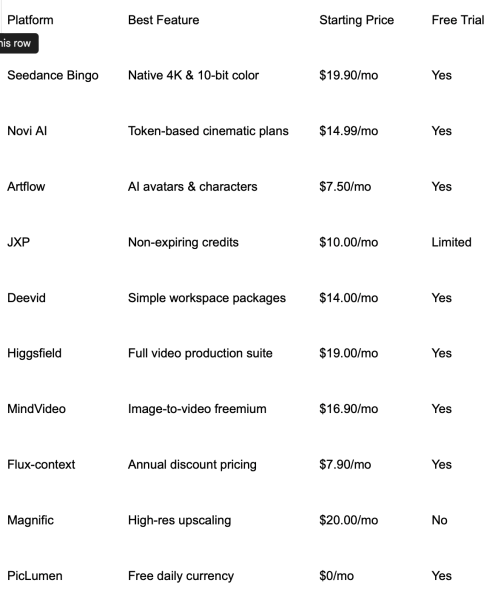
This article ranks the top 10 video generation platforms powered by or comparable to Seedance 2.5. We break down the features, pricing, pros, and cons of each tool to reveal their ideal user base. Discover the perfect cinematic platform to upgrade your outdated video creation workflow today.
Quick Comparison Table
1. Seedance Bingo
What Is Seedance Bingo?
Seedance Bingo is the official home of the Seedance 2.5 model. It offers 30-second video generation, up to 50 multimodal references, and native 4K with 10-bit color depth. The platform targets creators who want cinematic output without a steep learning curve. Its powerful multi-modal understanding ensures that every generated frame perfectly matches your complex reference constraints. The web interface responds rapidly, allowing professional users to manage massive media assets seamlessly.
Related stories
Key features include:
- Native 4K resolution with 10-bit color
- Up to 50 multimodal references per project
- 30-second continuous generation
- Free trial for new users
Pricing
The tiered subscription system scales from accessible starter kits up to high-capacity professional packages for heavy rendering.
- Starter: $19.90/mo
- Pro: $39.90/mo
- Max: $69.90/mo
- Ultra: $149.90/mo
Pros and Cons
Pros: True 4K output, generous reference limits, credit-tier flexibility.
Cons: Higher tiers get pricey for casual users.
Best For
Professional video creators who need broadcast-quality output and heavy multimodal input support.
2. Novi AI
What Is Novi AI?
Novi AI combines a token-based framework with cinematic subscription plans. It focuses on quick, polished short-form video generation. The interface is beginner-friendly, and the yearly plan offers a steep discount.
Users can instantly apply distinct cinematic styles to their projects with just a few clicks. The flexible credit management system ensures you only pay for the exact rendering time used.
Highlights:
- Cinematic presets
- Token flexibility
- Free trial available
Pricing
Its flat-rate monthly setup balances predictable pricing with flexible coin conversion for unexpected rendering needs.
- Free Trial: $0/mo
- Monthly Plan: $14.99/mo
- Yearly Plan: $10.91/mo
Pros and Cons
Pros: Affordable annual plan, easy onboarding, strong presets.
Cons: Limited advanced controls for pro editors.
Best For
Solo creators and social media managers who want cinematic clips without complexity.
3. Artflow
What Is Artflow?
Artflow specializes in AI-generated digital characters and avatar branding. It stands out for narrative and character-driven video work. Creators can build reusable characters across projects.
The website provides specialized tools that keep your digital actors recognizable across entirely different scenes and shots. You can easily adjust clothing styles and emotional expressions to maintain deep narrative continuity.
Core features:
- AI avatar creation
- Story-based video generation
- Multi-tier scaling for teams
Pricing
The budget-friendly base tier lowers entry costs while actor training sessions are billed as separate add-on purchases.
- Basic: $7.50/mo
- Creator: $15.00/mo
- Pro: $35.00/mo
- Ultra: $99.00/mo
Pros and Cons
Pros: Excellent character consistency, affordable entry tier, brand-friendly.
Cons: Not focused on realistic cinematic scenes.
Best For
Storytellers, animators, and brands building recurring avatar-based content.
4. JXP
What Is JXP?
JXP offers a dual-track pricing model with either non-expiring credits or monthly subscriptions. This flexibility appeals to users with unpredictable workloads. The platform focuses on efficient short-clip generation.
The intuitive dashboard allows you to keep track of your remaining processing power without complicated calculations. It handles sudden rendering requests efficiently, making it an excellent buffer tool for busy agency workflows.
Notable perks:
- Credits that never expire
- Two pricing tracks
- Straightforward UI
Pricing
The hybrid payment structure lets you supplement your standard monthly subscription with flexible, permanent top-up credits.
- Starter: $10.00/mo
- Premium: $30.00/mo
- Ultimate: $99.00/mo
Pros and Cons
Pros: Flexible billing, low starting price, no urgency to use credits.
Cons: Smaller feature set compared to premium tools.
Best For
Freelancers and part-time creators who work in bursts and hate expiring credits.
5. Deevid
What Is Deevid?
Deevid delivers a clean workspace with straightforward pricing packages. It's built for creators who want fewer distractions and more direct control. The tool avoids over-complicated dashboards.
By removing unnecessary settings, this streamlined page lets you focus entirely on your core creative concepts. The layout loads exceptionally fast on any device, maximizing production speed during tight deadlines.
Main strengths:
- Simple UI
- Reliable rendering
- Workspace-focused design
Pricing
The minimalist plan structure avoids hidden fees by wrapping all processing speeds into three predictable flat rates.
- Lite: $14.00/mo
- Pro: $35.00/mo
- Premium: $159.00/mo
Pros and Cons
Pros: Clean interface, predictable pricing, minimal learning curve.
Cons: Premium tier jumps sharply in cost.
Best For
Creators who prefer minimalism and reliable output over feature bloat.
6. Higgsfield
What Is Higgsfield?
Higgsfield is an advanced AI video production suite designed to handle end-to-end media creation. It excels at generating highly dynamic character motions and realistic physical interactions. The platform integrates robust editing tools that allow you to seamlessly refine complex video sequences within a unified workspace. This powerful system minimizes the need for third-party post-production software, optimizing your full creative pipeline.
Key features include:
- Monthly credit subscriptions for full video tools
- Advanced physics and character motion controls
- Built-in sequential video editor
Pricing
This monthly credit-based architecture gives full-time creators predictable access to heavy simulation and sequence generation features.
- Starter: $19.00/mo
- Plus: $59.00/mo
- Ultra: $129.00/mo
Pros and Cons
Pros: Excellent motion physics, integrated editor, feature-dense tiers.
Cons: Steeper learning curve for complete beginners.
Best For
Independent directors and advanced content creators looking for total control over character movement and scene construction.
7. MindVideo
What Is MindVideo?
MindVideo focuses on image-to-video tools with freemium access. It's ideal for users who already have visuals and want motion added. The image-first workflow is intuitive and fast.
The advanced motion-tracking algorithms breathe dynamic, logical physics into any uploaded two-dimensional illustration. It seamlessly transforms flat architectural concepts and concept art into lively, realistic environmental videos.
Feature list:
- Image-to-video conversion
- Freemium access
- Multiple output styles
Pricing
Its freemium setup grants basic generation capabilities daily, while paid tiers unlock faster priority rendering queues.
- Lite: $16.90/mo
- Pro: $29.90/mo
- Max: $69.90/mo
Pros and Cons
Pros: Great for animating existing artwork, freemium onboarding, smooth motion.
Cons: Text-to-video not its core strength.
Best For
Illustrators, photographers, and designers turning static images into motion.
8. Flux-context
What Is Flux-context?
Flux-context uses annual subscription structures with a 30% discount versus monthly billing. It rewards long-term users who commit early. The pricing is among the most competitive.
Its unique context engine analyzes long text prompts to maintain consistent background environments across several renders. The web control panel organizes extensive project histories cleanly, helping teams track long-term visual developments.
Strong points:
- Annual savings
- Context-aware generation
- Multiple usage tiers
Pricing
Committing to a full year unlocks massive discounts that make this platform highly competitive for ongoing workflows.
- Basic: $7.90/mo
- Pro: $19.90/mo
- Ultra: $69.00/mo
Pros and Cons
Pros: Big annual discount, low entry price, good context tracking.
Cons: Best value locked behind yearly commitment.
Best For
Creators ready to commit to a full year and lock in low pricing.
9. Magnific
What Is Magnific?
Magnific specializes in high-resolution generative upscaling. It doesn't just generate videos, it enhances them dramatically. This makes it a strong companion tool for other platforms.
The system injects incredible cinematic detail and textures into low-resolution clips during the enhancement process. It works wonders on compressed footage, turning soft AI generations into ultra-sharp professional masterpieces.
Key features:
- Token-based upscaling
- High-resolution output
- Multi-tier plans for pros
Pricing
The upscale token framework scales sharply upward, targeting dedicated studio budgets rather than casual hobbyist creators.
- Premium: $20.00/mo
- Premium+: $45.00/mo
- Business: $69.00/mo
- Pro: $280.00/mo
Pros and Cons
Pros: Best-in-class upscaling, sharp output, professional plans available.
Cons: No free trial, pricier top tier.
Best For
Post-production teams and pros enhancing existing AI video output.
10. PicLumen
What Is PicLumen?
PicLumen offers multi-tier plans with free daily currency. Users can generate without commitment thanks to the recurring free credit. The platform balances access and premium features.
The daily refreshing allowance gives casual creators enough freedom to practice without financial pressure. Upgrading unlocks high-priority servers that drastically shorten your rendering queues during peak hours.
Standout features:
- Free daily credit refill
- Wide tier variety
- Elite plan for heavy users
Pricing
The free tier provides daily credit rewards, while upgrading unlocks clean, watermark-free high-definition video assets.
- Basic Plan: $0/mo
- Lite Plan: $7.59/mo
- Standard Plan: $24.99/mo
- Pro Plan: $49.99/mo
- Elite Plan: $179.99/mo
Pros and Cons
Pros: Free daily allowance, wide pricing range, good scaling.
Cons: Free tier has generation limits.
Best For
Casual users who want to try AI video without paying anything upfront.
Key Takeaways: How Do You Choose the AI Video Tool That Suits You Best?
Picking the right platform depends on your goals, budget, and creative style. Here are quick pointers to help you decide:
- Need cinematic 4K output? Go with Seedance Bingo for native quality.
- Working with tight budgets? Try PicLumen's free tier or Flux-context's annual plan.
- Focused on characters and storytelling? Artflow is your best pick.
- Animating existing images? MindVideo excels here.
- Want post-production polish? Magnific handles upscaling best.
Always start with a free trial where possible. This lets you test workflow fit before committing to a paid tier.
Conclusion
The AI video landscape has shifted dramatically from low-resolution gimmicks toward true studio-grade production. Tools running the official Seedance 2.5 architecture prove that cinematic excellence is now accessible directly through a browser workflow.
This evolution is particularly impressive when compared to earlier versions like Seedance 2.0, which laid the foundation for today's advanced motion systems. Modern creators can easily achieve professional-grade depth, color precision, and reference consistency that were impossible just a generation ago.
The secret to success lies in mixing these diverse platforms to construct your own ideal creative pipeline. Try out the free trials, push the multimodal boundaries, and select the engine that best elevates your storytelling vision.
Frequently Asked Questions
What makes Seedance 2.5 different from other AI video models?
Seedance 2.5 supports native 4K, 10-bit color, 30-second generation, and up to 50 multimodal references. That combination is rare in the AI video space today.
Are free trials really enough to test these tools?
Free trials give you a feel for the interface and output quality. However, longer projects usually require a paid tier for full feature access.
Which tool is best for beginners?
Novi AI and PicLumen are excellent starting points. Both offer low entry pricing and beginner-friendly interfaces.
Can I use these AI videos commercially?
Most platforms allow commercial use on paid tiers. Always check the specific licensing terms before publishing.
Do I need a powerful computer to run these tools?
No, all listed platforms run in the cloud. You only need a stable internet connection and a modern browser.
Comments

Powered by RoundtableAn AI/DeFi-powered Enterprise Media Operating System. Learn more at Roundtable.io.© Roundtable 2026. By using this site you agree to the Terms of Use and Privacy Policy